













Quick answer: The best Playit.gg alternative depends on what you need. For a public tunnel to a game server with UDP support, Localtonet, LocalXpose and Pinggy are the closest replacements (ngrok does not support UDP). For a private group of friends, a mesh VPN such as Tailscale, ZeroTier or Radmin VPN creates a virtual LAN. And if you want to make the game server and share it without port forwarding in one app, HTN Panel includes a built-in tunnel.
Disclosure: HTN Panel is made by HTNetwork, which publishes this page. We have covered the other tools fairly so you can choose what suits you.
Written by Tom Pearce, founder of HTNetwork and creator of HTN Panel and HTN Tunnel.
What does Playit.gg do, and why look for an alternative?
Playit.gg is a tunnelling service built for game servers. It gives a server on your PC a public address and relays TCP and UDP traffic to it, so players can join without you port forwarding. Its free tier is widely reported to include four TCP and four UDP tunnels with a persistent address, and the client is open source.
It is a good tool, but people look elsewhere when they want:
- Lower latency. Every player's traffic travels through a relay; a mesh VPN or a nearby relay can be faster.
- More control or features, such as custom domains on a free plan or many simultaneous tunnels.
- A private group only. If only friends join, a virtual LAN avoids a public address entirely.
- Less setup. Playit is a separate agent you install and configure alongside your game server. Some people would rather have the server and tunnel in one app.
Playit.gg alternatives compared at a glance
Tool | Type | UDP for games | Free option | Best for |
|---|---|---|---|---|
Playit.gg (for comparison) | Game tunnel | Yes | Yes | Free public tunnels for game servers |
Localtonet | Tunnel | Yes | Paid, about $2 per tunnel a month | Many protocols and global locations |
LocalXpose | Tunnel | Yes | Limited | A tunnel app with a GUI |
Pinggy | Tunnel (SSH-based) | Yes | Limited, time-capped tunnels | Zero-install quick tunnels |
ngrok | Tunnel | No | Yes | TCP and web services, not UDP games |
Portmap.io, Packetriot, PageKite | Tunnels | Varies | Varies | Other ways to expose a local server |
Tailscale | Mesh VPN | Yes | Yes, for small groups | Private servers for a known group |
ZeroTier | Mesh VPN | Yes | Yes | Virtual LANs across the world |
Radmin VPN | Virtual LAN | Yes | Free | Quick LAN games on Windows |
All-in-one app (server + tunnel) | Supported games | 24-hour refund | Making and sharing a server from one Windows app |
Tunnelling and port-forwarding alternatives
These work like Playit: an agent on your PC opens an outbound connection to a relay, and players connect to the relay's public address. Check UDP support first, because most game servers need it.
Localtonet: best all-round paid tunnel
Localtonet supports HTTP, TCP, UDP and mixed TCP and UDP tunnels across many server locations, at around $2 per tunnel a month with unlimited bandwidth. A good fit if you want a reliable public address and do not mind paying a little.
LocalXpose: best tunnel app with a GUI
LocalXpose supports UDP natively and offers a desktop app as well as a command line, priced at around $6 a month for multiple tunnels.
Pinggy: best zero-install quick tunnel
Pinggy starts a tunnel with a single SSH command, including UDP tunnels, so there is nothing to install. The free tier limits how long a tunnel stays open, so a persistent address needs a paid plan of a few dollars a month.
ngrok: not ideal for most game servers
ngrok is excellent for web services and supports TCP, but it has no UDP tunnels on any plan, which rules it out for most game servers.
Portmap.io, Packetriot and PageKite
Other services that expose a local server through a relay. They are worth a look if the tools above do not fit, but check UDP support and relay locations before relying on them for a game server.
Mesh VPN and LAN alternatives for private groups
If only friends will join, you do not need a public address at all. A mesh VPN puts everyone's devices on one virtual network, so players connect as if they were on your LAN. The trade-off: every player has to install the same app and join your network, so it does not suit public servers.
Tailscale: best for small private groups
A zero-configuration mesh VPN built on WireGuard, with a free plan for personal use and small groups. Connections are often direct between devices, which can mean lower latency than a relay.
ZeroTier: best for a virtual LAN across the world
Creates a global virtual network that devices join with a network ID. Popular for LAN-only games and private servers.
Radmin VPN: best free option on Windows
A free Windows app for creating virtual LAN gaming sessions, widely used for games with LAN multiplayer.
All-in-one apps: make the server and share it in one place
Tunnels and VPNs only solve the connection. You still have to install, configure and run the game server separately. All-in-one desktop apps do both, which suits people who have never run a server before.
HTN Panel: best all-in-one alternative on Windows
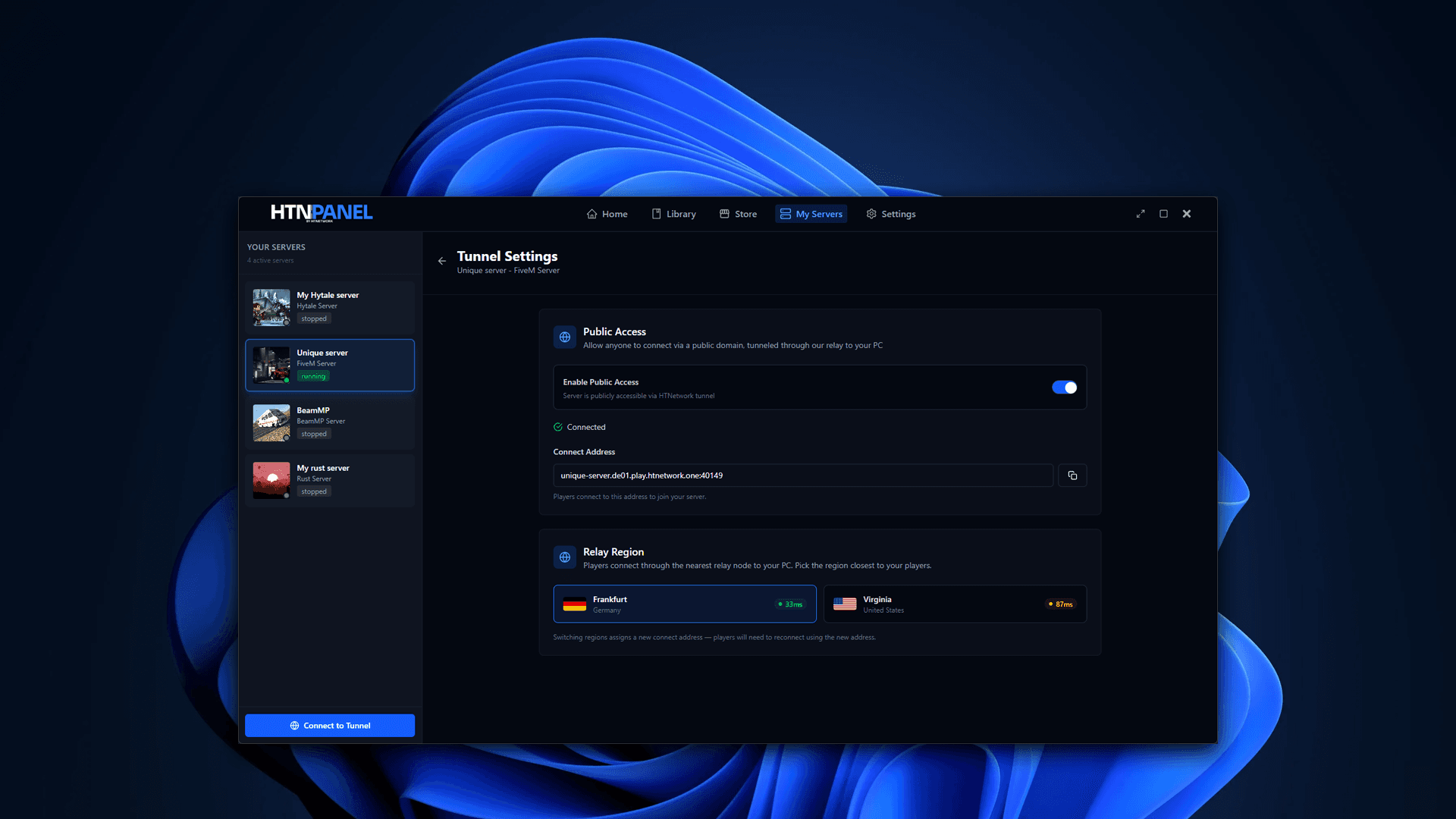
HTN Panel is a Windows app that makes a game server in one click and shares it through its built-in HTN Tunnel, with no port forwarding and no separate tunnel agent to set up. Turn on the tunnel for a server, copy its unique connect link and send it to your players.
Playit.gg | HTN Panel | |
|---|---|---|
What it does | Tunnel only | Makes and manages the server, plus a built-in tunnel |
Setup | Install and configure the Playit agent next to your server | Pick a game, make the server, switch on the tunnel |
Games | Anything you can run and point the tunnel at | FiveM, RedM, Minecraft, Rust, BeamMP, Hytale, ETS2, ATS and more |
Also included | No | File manager, backups, remote access for trusted users |
Price | Free tier, paid upgrades | $8.99 a month or $99.99 lifetime, every game, 24-hour refund |
Choose Playit instead if you already run your server another way and only need a free tunnel, or your game is not in HTN Panel's library.
Like any tunnel, HTN Tunnel does not host the server for you: your PC has to stay on, and your hardware and connection still need to handle the game and player count.
Other all-in-one options
SquidServers is another desktop app focused on Minecraft self-hosting without port forwarding. If you only run Minecraft, it is worth comparing.
Playit alternatives FAQ
Which app is better than Playit?
It depends on your goal. Localtonet, LocalXpose and Pinggy are strong paid tunnels with UDP support; Tailscale and ZeroTier are better for private groups; and HTN Panel is better if you want to make the server and share it from one app.
Is there anything better than Playit.gg?
For public game servers, Localtonet and LocalXpose offer more features and locations on paid plans. For friends-only servers, a mesh VPN like Tailscale can have lower latency. Playit's free tier is still hard to beat for a free public game tunnel.
Can ngrok replace Playit?
Not for most games. ngrok does not support UDP on any plan, and most game servers need UDP.
How do I run a game server without port forwarding?
Use a tunnel (Playit, Localtonet, LocalXpose or Pinggy), a mesh VPN (Tailscale, ZeroTier or Radmin VPN), or an all-in-one app like HTN Panel that includes a tunnel.
Do I still need to keep my PC on?
Yes, with every option on this page. Tunnels and VPNs only provide the connection; the game server still runs on your computer.
Summary
Playit.gg is still a strong free game tunnel, but there are good alternatives for every need: Localtonet, LocalXpose and Pinggy for public tunnels with UDP, Tailscale, ZeroTier and Radmin VPN for private groups, and HTN Panel for making and sharing a server from one Windows app.
Get HTN Panel: one licence for every game, with HTN Tunnel built in, $8.99 a month or $99.99 lifetime, with a 24-hour refund.